저는 dev, stage, prod 등 다양한 AWS 프로필과 여러 클러스터를 운영하고 있습니다. 하지만 대부분의 도구(jdbc URL, AWS CLI 등)는 기본적으로 default 프로필만 참조하기 때문에, 매번 원하는 프로필을 사용하려면 –profile 옵션을 반복해서 지정해야 합니다. 그래서 상황에 따라 ~/.aws/credentials 파일의 default 프로필을 수동으로 변경해가며 사용하고 있습니다.
이것도 너무 귀찮아서 default 프로필 변경해주는 딸깍버튼을 xbar 와 sh 로 만들었습니다. 추가로 aws 프로필 변경뿐만 아니라 git 프로필 변경도 만들어서 회사계정/개인계정 git ssh global rsa key 변경을 alias 에 넣어 sh 로 호출하도록 설정했고 한술 더 떠서 자주 치는 피아노 pdf 악보 버튼도 만들었습니다.
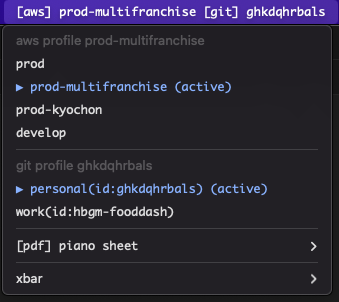
계정 변경 스크립트 세팅
- aws_profile_change.sh
#!/bin/bash

if [ -z "$1" ]; then
    echo "HELP: $0 <PROFILE_NAME>"
    exit 1
fi

CREDENTIALS_FILE="$HOME/.aws/credentials"
AWS_PROFILE=$1

is_valid() {
    local retval=0
    if [[ ! -f "$CREDENTIALS_FILE" ]]; then
        echo "$retval"
        return 0
    fi

    if grep -qx "^\[$AWS_PROFILE\]$" "$CREDENTIALS_FILE"; then
        retval=1
    fi

    echo "$retval"
}

get_aws_credentials() {
    local retval=$( is_valid )

    if [ "$retval" = "0" ]; then
        echo "$retval"
        return 0
    fi

    # Access Key 추출
    local access_key=$(sed -n "/^\[$AWS_PROFILE\]/,/^\[/p" "$CREDENTIALS_FILE" | grep "aws_access_key_id" | awk -F'=' '{print $2}' | tr -d ' ')

    # Secret Key 추출
    local secret_key=$(sed -n "/^\[$AWS_PROFILE\]/,/^\[/p" "$CREDENTIALS_FILE" | grep "aws_secret_access_key" | awk -F'=' '{print $2}' | tr -d ' ')

    echo "$access_key $secret_key"
}

update_aws_profile() {
    local creds
    creds=$(get_aws_credentials)


    if [ "$creds" = "0" ]; then
        echo "cannot find [$AWS_PROFILE] profile in $CREDENTIALS_FILE"
        exit 1
    else
        local access_key=$(echo "$creds" | awk '{print $1}')
        local secret_key=$(echo "$creds" | awk '{print $2}')

        aws configure set aws_access_key_id "$access_key" --profile "default"
        aws configure set aws_secret_access_key "$secret_key" --profile "default"

        echo "[default] profile is updated by [$AWS_PROFILE] profile"
    fi
}

update_aws_profile
- mac 이라서 zsh 의 기본 PATH 에 bin 패스 추가
mkdir -p ~/bin
cp ~/scripts/aws_profile_change.sh ~/bin/aws-profile
chmod +x ~/bin/aws-profile

echo 'export PATH="$HOME/bin:$PATH"' >> ~/.zshrc
source ~/.zshrc
- execute!
ghkdqhrbals@ghkdqhrbalsui-MacBookPro scripts % aws-profile prod
[default] 프로파일이 [prod] 프로파일로 업데이트되었습니다.
쉘 스크립트
함수
- 함수 내에서 사용하는 return 은 일반적인 return 이 아니라 exit code 라고 보면 됨. 0 ~ 255 사이 종료코드 중 어떤 것을 내보낼 지 선택하는 것임. 0은 정상종료코드.
- 여러가지 방법으로 부모스택에 리턴값(string)을 전달가능. 그 중 가장 자주쓰는건 echo 로 출력하는 방법.
- 객체 이런거 없기때문에 여러개 리턴할려면 echo 로 출력 후 awk $1 $2 로 받아서 사용
- $? : 바로 직전 명령어의 exit code 반환. 그래서 함수 호출 후 바로 $? 로 확인 가능.
- local 로 변수 중복을 막아주자!
IF 문
- ”” 값 true, “1” 들어가면 true 로 분기되어서 빈 값을 넣어줘야함.
- if 조건문에 [] 필수. (()) 산술연산 전용.
- if [ -z “$1” ] : $1 이 비어있으면 true
I operate several AWS profiles and clusters, such as dev, stage, and prod. But most tools, such as JDBC URLs and the AWS CLI, refer to the default profile by default. So every time I want to use a specific profile, I need to repeatedly specify the --profile option. Because of that, I have been manually changing the default profile in ~/.aws/credentials depending on the situation.
This was also too annoying, so I made a click-button with xbar and shell script that changes the default profile. In addition to AWS profile switching, I also made Git profile switching, so company/personal Git SSH global RSA keys can be changed through an alias that calls a shell script. I even made a button for piano PDF scores I often play.
Account switching script setup
- aws_profile_change.sh
#!/bin/bash

if [ -z "$1" ]; then
    echo "HELP: $0 <PROFILE_NAME>"
    exit 1
fi

CREDENTIALS_FILE="$HOME/.aws/credentials"
AWS_PROFILE=$1

is_valid() {
    local retval=0
    if [[ ! -f "$CREDENTIALS_FILE" ]]; then
        echo "$retval"
        return 0
    fi

    if grep -qx "^\[$AWS_PROFILE\]$" "$CREDENTIALS_FILE"; then
        retval=1
    fi

    echo "$retval"
}

get_aws_credentials() {
    local retval=$( is_valid )

    if [ "$retval" = "0" ]; then
        echo "$retval"
        return 0
    fi

    # Extract Access Key.
    local access_key=$(sed -n "/^\[$AWS_PROFILE\]/,/^\[/p" "$CREDENTIALS_FILE" | grep "aws_access_key_id" | awk -F'=' '{print $2}' | tr -d ' ')

    # Extract Secret Key.
    local secret_key=$(sed -n "/^\[$AWS_PROFILE\]/,/^\[/p" "$CREDENTIALS_FILE" | grep "aws_secret_access_key" | awk -F'=' '{print $2}' | tr -d ' ')

    echo "$access_key $secret_key"
}

update_aws_profile() {
    local creds
    creds=$(get_aws_credentials)

    if [ "$creds" = "0" ]; then
        echo "cannot find [$AWS_PROFILE] profile in $CREDENTIALS_FILE"
        exit 1
    else
        local access_key=$(echo "$creds" | awk '{print $1}')
        local secret_key=$(echo "$creds" | awk '{print $2}')

        aws configure set aws_access_key_id "$access_key" --profile "default"
        aws configure set aws_secret_access_key "$secret_key" --profile "default"

        echo "[default] profile is updated by [$AWS_PROFILE] profile"
    fi
}

update_aws_profile
- Since this is Mac, add the bin path to the default zsh
PATH.
mkdir -p ~/bin
cp ~/scripts/aws_profile_change.sh ~/bin/aws-profile
chmod +x ~/bin/aws-profile

echo 'export PATH="$HOME/bin:$PATH"' >> ~/.zshrc
source ~/.zshrc
- execute
ghkdqhrbals@ghkdqhrbalsui-MacBookPro scripts % aws-profile prod
[default] profile has been updated to the [prod] profile.
Shell script
Function
returninside a function is not a normal return. Think of it as an exit code. It chooses which exit code between 0 and 255 to return. 0 means normal exit.- There are several ways to pass a return value, such as a string, to the parent stack. The most commonly used method is printing with
echo.- Since there is no object type, if you want to return multiple values, print them with
echoand receive them withawk $1 $2. $?: returns the exit code of the immediately previous command. So you can check it with$?right after calling a function.
- Since there is no object type, if you want to return multiple values, print them with
- Use
localto prevent variable conflicts.
IF statement
- An empty
""value is true, and"1"also branches as true, so an empty value needs to be inserted carefully. []is required in an if condition.(())is for arithmetic operations only.if [ -z "$1" ]: true if$1is empty.