m1 에서 docker 로 ollama gemma3 모델 서빙할려고 했는데 너무 느림… 그래서 찾아보니 ollama 측에 이슈 봤는데 여기서 답변을 잘 해줌.
https://github.com/ollama/ollama/issues/3849
맥에서는 docker 에 gpu 메탈가속을 공유하지 못해서 느리다고 함. 그래서 그냥 맥에서 직접 서빙해야한다. 여기서 모델 하나만 쓴다고 가정한다면 ollama 에서 모델에 리소스를 집중시킬 수 있고 몇 가지 파라미터로 병렬성을 조절할 수 있다. 이걸 시스템 변수로 설정해주고 해당 프로세스에서 export 해주면 된다.
ghkdqhrbals@ghkdqhrbalsui-MacBookPro client % export OLLAMA_NUM_PARALLEL=16
ghkdqhrbals@ghkdqhrbalsui-MacBookPro client % export OLLAMA_MAX_LOADED_MODELS=1
이 때 큐를 너무 크게 잡지않는게 좋음. 언제까지 기다릴 수 없기때문에 빠르게 리소스 부족을 ollama 가 내 서버에게 말해주는게 좋다.
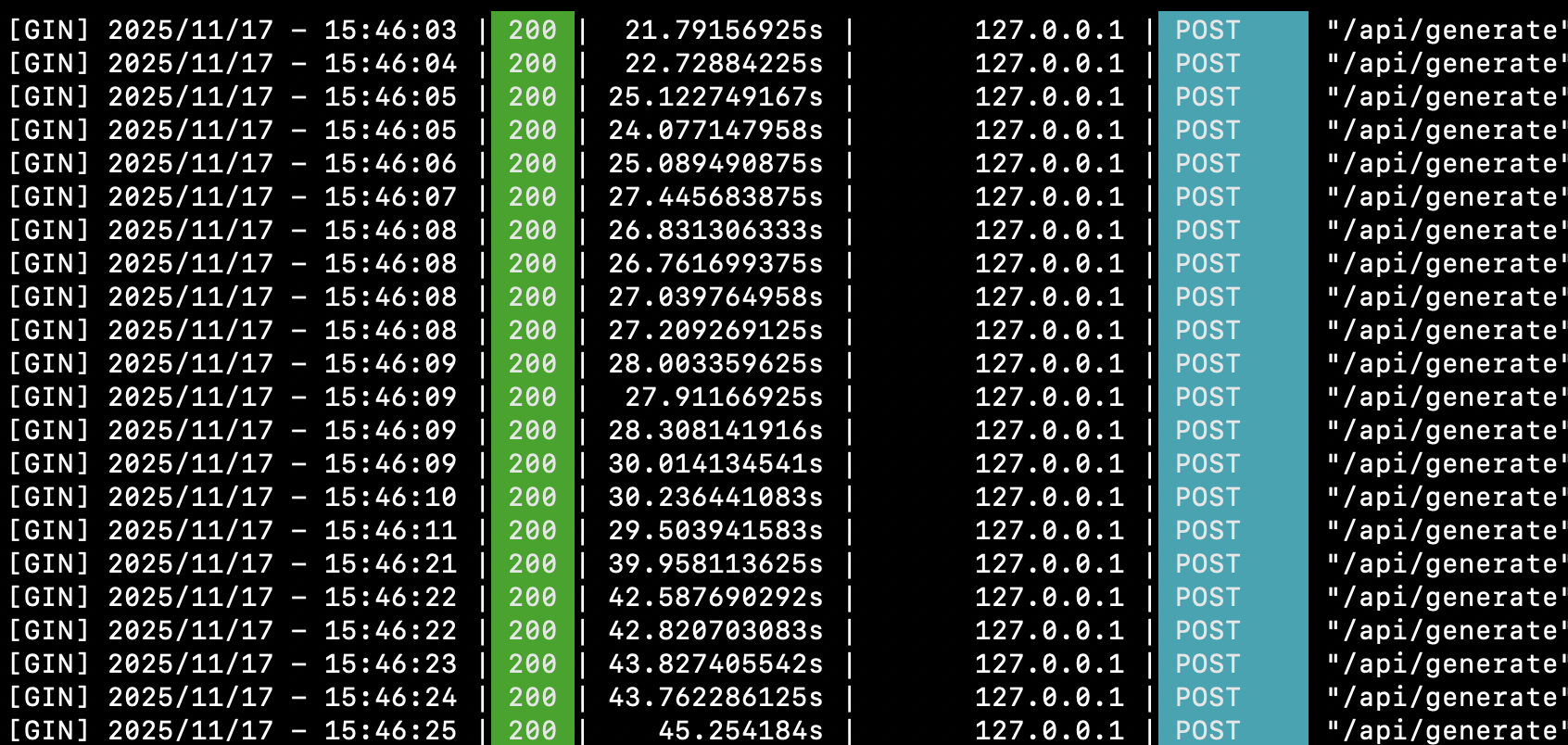
긴 컨텍스트는 아니지만 M1 max 64GB ram 에서 gemma3 모델을 ollama 로 서빙할 때 저정도 속도가 나옴. gpu 사용률은 거의 95% 까지 올라가는것을 확인했다(병렬로 풀로드 잘 돌아가고 있음). 당연히 mac -> docker gpu 싱크 지원을 안하기 떄문에 docker 로 돌리는것보다 훨씬 빨랐다.
ollama 서버 병렬지원 실행 및 docker 묶어서 로컬 배포 스크립트
#!/bin/bash

set -e

echo "=========================================="
echo "Starting Docker containers using docker-compose..."
echo "=========================================="
docker compose -f docker-compose.yml up -d

echo "=========================================="
echo "Starting Ollama server with parallel processing enabled..."
echo "OLLAMA_NUM_PARALLEL: ${OLLAMA_NUM_PARALLEL:-default}"
echo "OLLAMA_MAX_LOADED_MODELS: ${OLLAMA_MAX_LOADED_MODELS:-default}"
echo "OLLAMA_MAX_QUEUE: ${OLLAMA_MAX_QUEUE:-default}"
echo "OLLAMA_FLASH_ATTENTION: ${OLLAMA_FLASH_ATTENTION:-default}"
echo "OLLAMA_KEEP_ALIVE: ${OLLAMA_KEEP_ALIVE:-default}"
echo "=========================================="

ollama serve &

# Ollama 서버가 준비될 때까지 대기
echo "Waiting for Ollama server to be ready..."
for i in {1..30}; do
    if curl -s http://localhost:11434/api/tags > /dev/null 2>&1; then
        echo "Ollama server is ready!"
        break
    fi
    echo "Waiting... ($i/30)"
    sleep 2
done

# 환경변수에서 모델 이름 가져오기 이거 gemma3 미리 설치해놓으면 좋음
MODEL_NAME=${OLLAMA_MODEL:-gemma3}

echo "Checking for model: $MODEL_NAME"

# 모델이 이미 존재하는지 확인
if ollama list | grep -q "$MODEL_NAME"; then
    echo "Model $MODEL_NAME already exists"
else
    echo "Pulling model: $MODEL_NAME (this may take a few minutes)..."
    ollama pull "$MODEL_NAME"
    echo "Model $MODEL_NAME pulled successfully"
fi

# 모델 목록 출력
echo "Available models:"
ollama list

echo "Ollama is ready with model: $MODEL_NAME"
echo "Server running at http://localhost:11434"

# 백그라운드 프로세스 유지
wait
I tried to serve the Ollama Gemma 3 model through Docker on an M1, but it was too slow. I looked around and found an Ollama issue where the answer explained it well.
https://github.com/ollama/ollama/issues/3849
On macOS, Docker cannot share GPU Metal acceleration, so it is slow. That means it should just be served directly on the Mac. If you assume that only one model is used, Ollama can focus resources on that model, and parallelism can be controlled with a few parameters. You can set these as system variables and export them in the process.
ghkdqhrbals@ghkdqhrbalsui-MacBookPro client % export OLLAMA_NUM_PARALLEL=16
ghkdqhrbals@ghkdqhrbalsui-MacBookPro client % export OLLAMA_MAX_LOADED_MODELS=1
At this point, it is better not to set the queue too large. Since the server cannot wait forever, it is better for Ollama to quickly tell my server that it is short on resources.
This is not a long-context case, but when serving the Gemma 3 model with Ollama on an M1 Max with 64GB RAM, the speed was around this level. I confirmed that GPU usage went up to almost 95%, so the parallel full load was working properly. Naturally, because Docker does not support syncing Mac GPU acceleration, running it directly was much faster than running it through Docker.
Local deployment script that starts the Ollama server with parallel support and Docker together
#!/bin/bash

set -e

echo "=========================================="
echo "Starting Docker containers using docker-compose..."
echo "=========================================="
docker compose -f docker-compose.yml up -d

echo "=========================================="
echo "Starting Ollama server with parallel processing enabled..."
echo "OLLAMA_NUM_PARALLEL: ${OLLAMA_NUM_PARALLEL:-default}"
echo "OLLAMA_MAX_LOADED_MODELS: ${OLLAMA_MAX_LOADED_MODELS:-default}"
echo "OLLAMA_MAX_QUEUE: ${OLLAMA_MAX_QUEUE:-default}"
echo "OLLAMA_FLASH_ATTENTION: ${OLLAMA_FLASH_ATTENTION:-default}"
echo "OLLAMA_KEEP_ALIVE: ${OLLAMA_KEEP_ALIVE:-default}"
echo "=========================================="

ollama serve &

# Wait until the Ollama server is ready.
echo "Waiting for Ollama server to be ready..."
for i in {1..30}; do
    if curl -s http://localhost:11434/api/tags > /dev/null 2>&1; then
        echo "Ollama server is ready!"
        break
    fi
    echo "Waiting... ($i/30)"
    sleep 2
done

# Load the model name from environment variables.
# It is better to preinstall gemma3.
MODEL_NAME=${OLLAMA_MODEL:-gemma3}

echo "Checking for model: $MODEL_NAME"

# Check whether the model already exists.
if ollama list | grep -q "$MODEL_NAME"; then
    echo "Model $MODEL_NAME already exists"
else
    echo "Pulling model: $MODEL_NAME (this may take a few minutes)..."
    ollama pull "$MODEL_NAME"
    echo "Model $MODEL_NAME pulled successfully"
fi

# Print the model list.
echo "Available models:"
ollama list

echo "Ollama is ready with model: $MODEL_NAME"
echo "Server running at http://localhost:11434"

# Keep the background process alive.
wait